David Meeker
June 10, 2004
1. Introduction
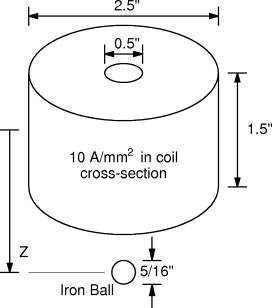
This example considers the computation of the force on an iron ball at various positions relative to a wound, air-cored coil. The configuration is similar to some coil guns that are designed to shoot ball bearings. The specific configuration in pictured below in Figure 1.
Figure 1: Wound coil acting on an iron ball.
In particular, this example is mean to demonstrate the following concepts in FEMM:
2. Problem Setup
In many instances, one would like to perform some sort of batch run in which perhaps one parameter in a problem is changed over the course of several program runs. When this is the case, it is typically advisable to draw the geometry from scratch inside a Lua script. It is typically easier to draw the geometry in the interactive FEMM preprocessor and change just the parameters of interest from run to run—this substantially simplifies the required Lua script.
An input geometry that describes the problem of interest is shown below in Figure 2. The iron ball is initially located 1.5" from the center of the coil.
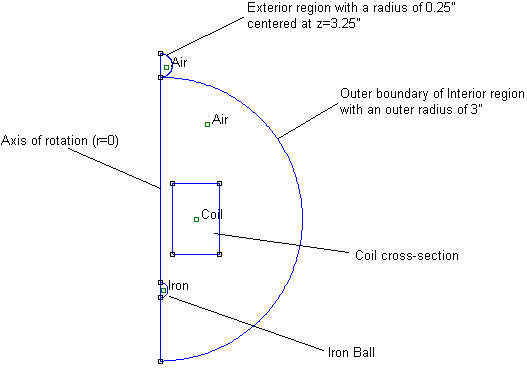
Figure 2: Geometry in finite element
pre-processor.
2.1 Labeling of the Moving Parts
FEMM contains a notion of "group" membership. A group number is a label that can be applied to the various lines, arcs, and block labels in a geometry. The advantage of assigning entities to a group number is that then all of the members of the group can be selected with either a single click in the user interface or a single command in a Lua script. A second command can then be used to move all of the selected entites.l
To make it simpler to move the iron ball, all parts of the ball has been assigned to be members of group number 1. All other parts are members of group number 0, which is the default group number for entities that are not explicitly defined to be a member of a number group. It is relatively easy to assign a region to a given group. Put the preprocessor into group mode by pressing the "group" more button, as shown in Figure 3: