Native Implementation
Richard Crozier has created XFEMM, a set of Linux command line tools that implement FEMM magnetics functionality. See: https://sourceforge.net/projects/xfemm/
Running FEMM on Linux via Wine
FEMM can be run on Linux machines using Wine. Performance of the program is about the same running on Linux with Wine compared to running natively on Windows. If Wine is not already installed on your system, installation instructions for Wine are at http://wiki.winehq.org/HowTo
FEMM 4.2
FEMM 4.2 works correctly with Wine. The most recent Linux compatibility testing used:
- FEMM 4.2 (06Oct2018) with Wine 3.0.3-2 running on Ubuntu 18.10

<html><b>OctaveFEMM</b></html>
Amazingly enough, OctaveFEMM works under Linux and will allow a native Linux implementation of Octave to interact with FEMM 4.2 running under Wine. In FEMM 4.2, the OctaveFEMM package is automatically installed as part of the regular FEMM 4.2 distribution.
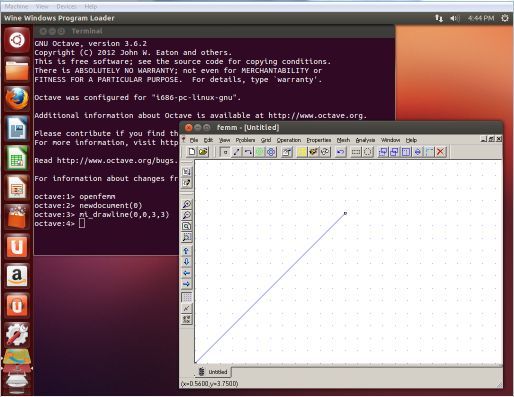
To get OctaveFEMM running correctly, the directory with the OctaveFEMM .m files must first be added to Octave's search path. If yours is a typical Wine installation, the correct directory can be added by using following at the Octave command line:
<html><code>addpath("~/.wine/drive_c/femm42/mfiles");<br>savepath;</code></html>
Then, the openfemm.m function in the OctaveFEMM function needs to be modified in two ways:
- The path to the femm binary directory needs to be modified to point to the location of the femm binary directory as seen by Linux;
- The system call that starts up femm needs to be modified so that it starts up femm.exe using Wine.
Here is an example modified version of openfemm.m where the paths have been defined for the typical Wine installation:
(matlab;openfemm.m)
function openfemm(fn)
  global ifile ofile HandleToFEMM

  rootdir=tilde_expand('~/.wine/drive_c/femm42/bin/');

  try
    pkg load windows
  catch
  end

  if (exist('actxserver'))
    HandleToFEMM=actxserver('femm.ActiveFEMM');
    callfemm([ 'setcurrentdirectory(' , quote(pwd) , ')' ]);
  else
    % define temporary file locations
    ifile=[rootdir,'ifile.txt'];
    ofile=[rootdir,'ofile.txt'];

    % test to see if there is already a femm process open
    try
      [fid,msg]=fopen(ifile,'wt');
    catch
      [fid,msg]=fopen(ifile,'w');
    end
    fprintf(fid,'flput(0)');
    fclose(fid);
    sleep(0.25);
    try
      [fid,msg]=fopen(ofile,'rt');
    catch
      [fid,msg]=fopen(ofile,'r');
    end
    if (fid==-1)
      unlink(ifile);
      system(['wine "',rootdir,'femm.exe" -filelink'],0,'async');
    else
      fclose(fid);
      unlink(ofile);
      disp('FEMM is already open');
    end
  end

   % make sure that FEMM isn't in FEMM 4.0 compatibility mode,
   % otherwise some commands won't work right
   callfemm('setcompatibilitymode(0)');
Another working approach is to install a Windows version of Octave and run it via Wine. This approach allows ActiveX to be used for interprocess communication, which is much faster than communication via temporary files.
–