Tangle Extended .poly File Format
Tangle reads .poly files compatible with Shewchuk's Triangle, plus optional extension sections for arc segments and periodic boundary conditions (PBCs). This document describes the full format.
Comments in .poly files begin with ~# and extend to end of line. Blank lines are ignored. All indices are 0-based or 1-based; tangle detects which from the first vertex index.
Standard Sections (Triangle-compatible)
1. Vertices
Header line:
<# of vertices> <dimension (must be 2)> <# of attributes> <# of boundary markers (0 or 1)>
Followed by one line per vertex:
<vertex #> <x> <y> [attributes] [boundary marker] [LFS]
The optional LFS (local feature size) column appears after the last declared column (i.e. after attributes and/or marker, or directly after the coordinates if neither is present). It sets a maximum desired edge length at that vertex. This is a tangle extension; Triangle ignores trailing columns.
2. Segments
Header line:
<# of segments> <# of boundary markers (0 or 1)>
Followed by one line per segment:
<segment #> <endpoint 1> <endpoint 2> [boundary marker] [LFS]
The optional LFS column sets a maximum desired edge length for that segment (propagated to its endpoints). Boundary markers are integers; negative markers are used for PBC pairing (see below).
3. Holes
Header line:
<# of holes>
Followed by one line per hole:
<hole #> <x> <y>
Each hole is a seed point. Tangle removes all triangles reachable from a hole seed without crossing a constrained edge.
4. Regions (optional)
Header line:
<# of regions>
Followed by one line per region:
<region #> <x> <y> <attribute> [maximum area]
Each region is a seed point. When -A is specified, all triangles flood-filled from the seed (without crossing constrained edges) are assigned the given attribute. An optional maximum area constrains element size in that region (requires -a).
Extension Sections (tangle-specific)
The following sections appear after the regions section, in order. Both are optional; if absent, tangle behaves identically to Triangle.
5. Arc Segments (optional)
Header line:
<# of arcs> <# of boundary markers (0 or 1)>
Followed by one line per arc:
<arc #> <endpoint 1> <endpoint 2> <angle> <max seg angle> [boundary marker] [LFS]
Each arc defines a circular arc between two existing vertices.
- endpoint 1, endpoint 2 — Vertex indices of the arc's start and end points.
- angle — Subtended angle in degrees (1 to 180). The arc center is computed from the chord (endpoint 1 to endpoint 2) and this angle, with the center on the left side of the chord when traversing from endpoint 1 to endpoint 2.
- max seg angle — Maximum angle per chord segment in degrees. The arc is discretized into ceil(angle / max_seg_angle) equal chord segments. Values outside [0.01, 10] are clamped to 10.
- boundary marker (if header says markers are present) — Integer boundary marker assigned to all chord segments.
- LFS (optional, after marker) — Local feature size constraint for the arc's chord segments and generated interior vertices.
Tangle creates intermediate vertices along the arc and replaces the arc with a chain of straight constrained segments. These segments participate in CDT enforcement, hole removal, quality refinement, and PBC pairing just like ordinary segments.
6. Periodic Boundary Conditions (optional)
Header line:
<# of PBC definitions>
Followed by one line per PBC definition:
<PBC #> <marker A> <marker B> <type>
Each PBC definition pairs two boundary chains identified by their segment boundary markers.
- marker A, marker B — Boundary marker values identifying the two segment chains to be paired. All segments with marker A form one chain; all segments with marker B form the other. The two chains must have the same number of segments.
- type — 0 = periodic, 1 = anti-periodic.
Tangle matches the two chains node-by-node (by arc-length parameter), ensuring that segment splits during quality refinement are synchronized: when a segment on one chain is split, its partner on the paired chain is split at the corresponding parametric position. After meshing, the paired node list is written to a .pbc output file.
Output Files
Tangle produces the following output files (with .1 suffix by default, suppressed by -I):
| File | Contents |
| <base>.1.node | Vertices (same format as .node input) |
| <base>.1.ele | Triangles (vertex indices, optional region attribute) |
| <base>.1.edge | Edges with boundary markers (if -e) |
| <base>.1.neigh | Triangle neighbor indices (if -n) |
| <base>.1.poly | Updated PSLG with refined segments (unless -P) |
| <base>.1.pbc | PBC node pairs (if PBC definitions present) |
The .pbc file format is:
<# of node pairs>
<pair #>  <node A>  <node B>  <type>
where type is 0 (periodic) or 1 (anti-periodic).
Examples
1. Simple PBC example
A .poly file pairing the left and right edges of a square:
# Vertices: 4 vertices, 2D, no attributes, 1 boundary marker
4 2 0 1
1  0.0  0.0  1
2  2.0  0.0  2
3  2.0  2.0  1
4  0.0  2.0  2

# Segments: 4 segments, boundary markers present
4 1
1  1  2  0
2  2  3  1
3  3  4  0
4  4  1  2

# Holes
0

# Regions
0

# Arc segments: 0 arcs (section may be omitted entirely)
0 0

# PBC: pair left edge (marker 2) with right edge (marker 1)
1
1  1  2  0
2. Kelvin transformation example
A practical use of arc segments and PBCs is modeling an object in free space using the Kelvin transformation. The physical domain is enclosed in a circular boundary, and the Kelvin transformation maps all of exterior free space into a second circle of finite size. PBCs connect the two circular boundaries so that the finite element solution on one boundary is coupled to the other.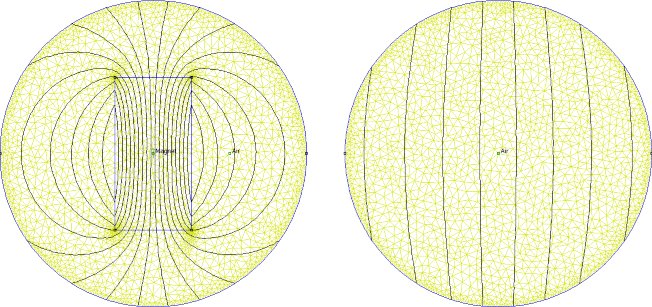
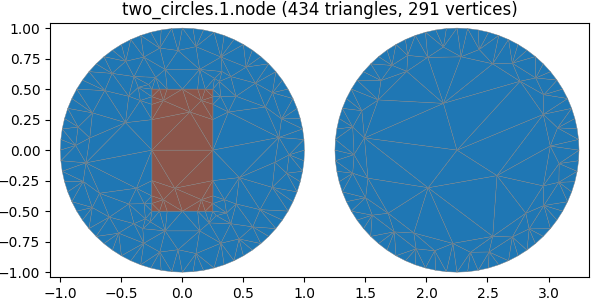
The following .poly models a rectangular permanent magnet (region 2) inside a circular physical domain (region 1), with a second circle representing the Kelvin-transformed exterior (also region 1). Each circle is formed by two 180-degree arcs, and the corresponding arcs on the two circles are paired via PBCs.
# Permanent magnet in free space via Kelvin transformation
#
# Circle 1 (physical domain): center (0,0), radius 1
# Circle 2 (Kelvin exterior): center (2.25,0), radius 1
# Rectangle (magnet):         corners (-0.25,-0.5) to (0.25,0.5)
9 2 0 0
1  -1.0   0.0
2   1.0   0.0
3   1.25  0.0
4   3.25  0.0
5  -0.25 -0.5  0.1
6   0.25 -0.5  0.1
7   0.25  0.5  0.1
8  -0.25  0.5  0.1
9   2.25  0.0

# Segments: rectangle edges
4 1
1  5  6  0
2  6  7  0
3  7  8  0
4  8  5  0

# Holes
0

# Regions: circle interiors = 1, rectangle = 2
3
1   0.0   0.75  1
2   0.0   0.0   2
3   2.25  0.5   1

# Arc segments: two 180-degree arcs per circle, 5-degree discretization
4 1
1  1  2  180  5  1
2  2  1  180  5  2
3  3  4  180  5  3
4  4  3  180  5  4

# PBC: pair corresponding arcs between circles
2
1  1  3  0
2  2  4  0
The LFS value of 0.1 on the rectangle corners drives local mesh refinement around the magnet. The resulting .pbc file contains the node-to-node pairing needed to assemble the coupled system.
| File | Last modified | Size |
|---|---|---|
| 2circMesh.png | 2026-03-14 09:59 | 107Kb |
| 2circSmall.png | 2026-03-14 08:57 | 337Kb |